How AI Analyzes Squat, Bench, Deadlift Videos
A phone video can turn into lift feedback in minutes. I look at how AI takes each frame of your squat, bench press, or deadlift, tracks your joints and the bar, measures angles and timing, and turns that into cues you can use on your next set.
Here’s the short version:
- AI reads video frame by frame
- It tracks 25 to 33 body landmarks
- Joint-angle detection can be as close as ±2.5°
- Joint position can be within about ±1 inch (±2–3 cm) in good recording conditions
- It checks depth, bar path, tempo, lockout, and left-right differences
- Then it gives you 1 to 3 top cues instead of dumping every issue at once
If I had to sum it up in one line, it’s this: AI does not “watch” your lift like a coach; it converts your movement into numbers, compares those numbers to lift rules, and sends back plain feedback.
A few points matter most before you even upload:
- For squat and deadlift, a side view works best
- For bench press, a front view helps more
- Record at 30 fps
- Keep your full body and barbell in frame
- Use steady lighting and a stable phone position
Here’s a fast side-by-side look at what the system checks:
| Lift | Best Camera View | Main Checks | Common Issues Spotted |
|---|---|---|---|
| Squat | Side | Depth, knee tracking, torso angle | Shallow reps, knees caving, hips shooting up |
| Bench Press | Front | Bar path, elbow position, even lockout | Uneven press, elbow flare, shaky wrists |
| Deadlift | Side | Setup angle, bar drift, lockout timing | Early hip rise, rounded back, bar moving forward |
What I like about this process is how direct it is. You upload a clip, the system cleans the footage, splits the set into reps, scores each rep, and stores the results so you can track form over time with session dates, load, and technique scores like 0–100.
Below, I break down how that pipeline works from recording to feedback, without repeating the full article word for word.
How AI Reads Your Lift on Video
Camera Angle, Frame Rate, and Video Quality
Before the system gives you any feedback, it needs clean footage. That starts with phone placement.
A side-facing angle works best for squats and deadlifts because it gives the system a clear look at your hips, knees, and ankles. For bench press, a front-facing angle is better because it helps spot elbow flare and bar path symmetry. Keep your whole body in frame for every rep. If your feet disappear at the bottom of a squat, or your head gets cut off at lockout, the system loses key landmarks.
Distance matters too. Set your phone far enough back to catch the full range of motion, from the top of a standing squat to the floor position in a deadlift. Use a tripod or a stable surface. Shaky footage makes bar-path and velocity tracking harder.
Record at 30 fps with bright, even lighting. Backlighting, like standing in front of a window, can turn you into a silhouette and make joint detection less reliable. A plain background helps. Fitted clothing also makes it easier for the system to see joint positions.
Once the footage is clear and steady, AI can map your body frame by frame.
Pose Estimation and Joint Tracking
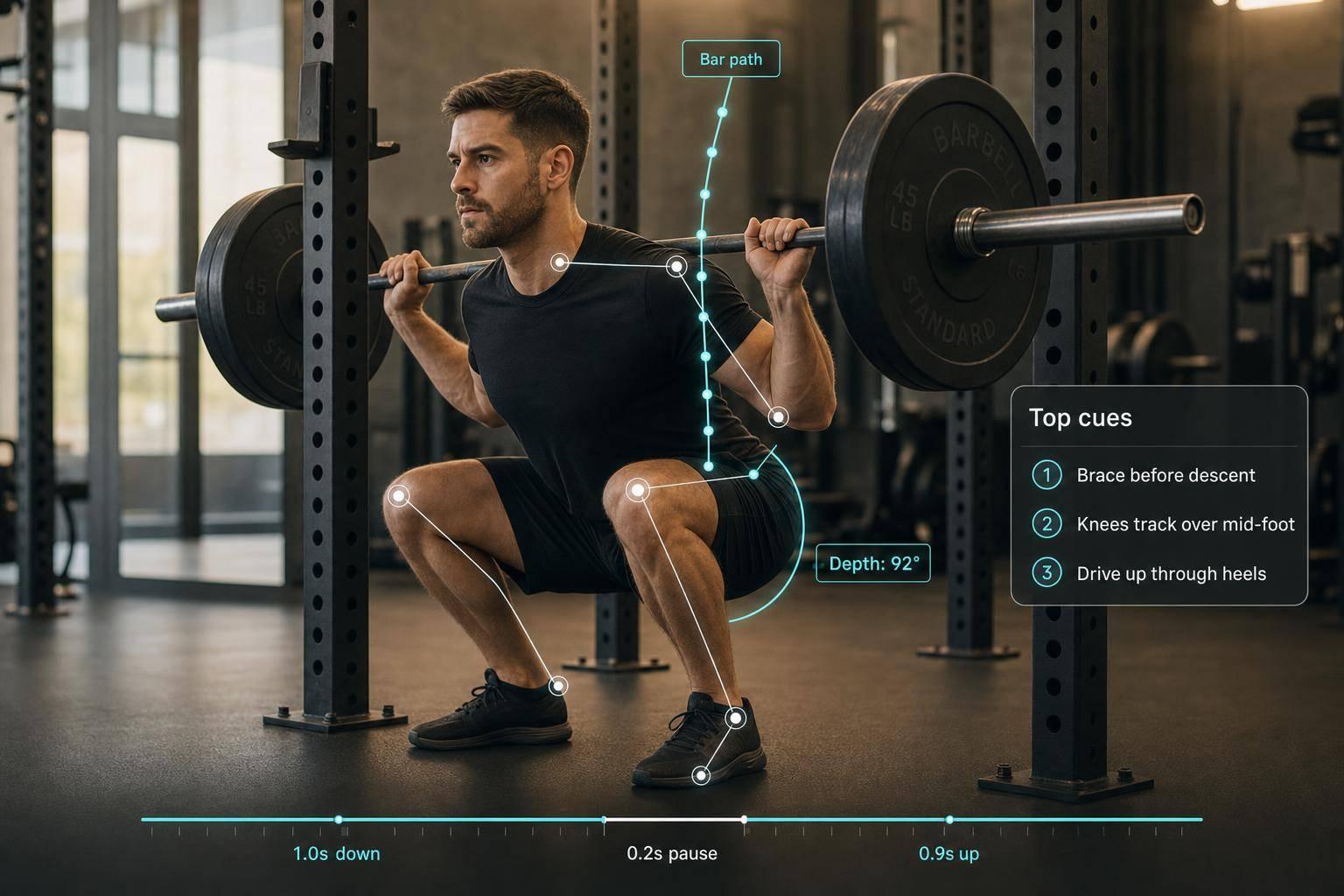
With usable video loaded, AI identifies the lifter and barbell frame by frame. Computer vision tracks both your joints and the bar position across the clip. The system marks key points, usually 25 to 33 landmarks, including shoulders, elbows, wrists, hips, knees, and ankles [4][1].
Those landmarks are connected into a digital skeleton overlay that updates on every frame. The system tracks your joints and the barbell at the same time. If a joint gets blocked for a moment by a shadow or the bar itself, temporal smoothing helps fill the gap by estimating its position from the frames around it. That keeps the data stream steady.
Modern AI pose detection can measure joint positions to within about 1 inch (±2–3 cm) [6], and keypoint detection can reach 95%+ accuracy when recording conditions are good [1].
Those tracked points are then turned into angles and motion data for lift analysis.
From Tracked Points to Joint Angles and Motion Data
The angle between your hip, knee, and ankle tells the system how deep your squat goes. The angle at your elbow helps it judge bench press position. And it does this across every frame, not from a single still image.
The system also tracks the barbell's center and movement path. That's how it can spot a deadlift bar drifting away from your shins.
Across the full video, AI measures:
- Joint angles
- Bar path
- Tempo
- Rep timing
Those measurements feed into rep segmentation and scoring next.
| Exercise | Key Landmarks Tracked | Primary Metric Measured |
|---|---|---|
| Squat | Hip, knee, ankle | Depth and torso lean |
| Bench Press | Shoulder, elbow, wrist | Elbow flare and bar path |
| Deadlift | Shoulder, hip, knee | Back alignment and hinge timing |
Creating Your Own AI Fitness Trainer: Analyzing Squats with MediaPipe
How AI Processes Squat, Bench, and Deadlift Videos Step by Step
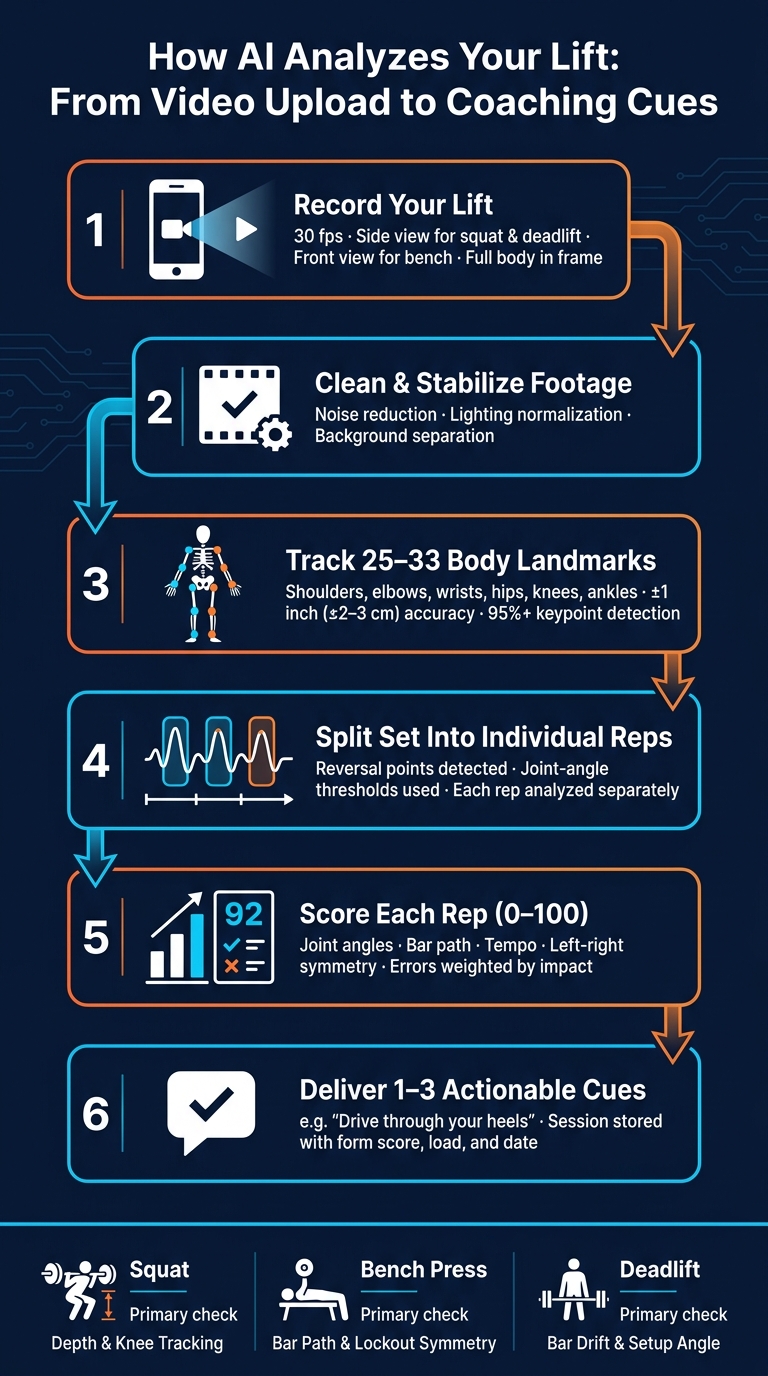
How AI Analyzes Your Lift: From Video Upload to Coaching Cues
Upload, Preprocessing, and Rep Segmentation
After the system tracks joints and bar position, it cleans up the clip and splits the lift into reps. First, it reduces noise, evens out lighting, and stabilizes the video. It also separates the lifter from the background so the analysis stays locked on the right person.
Then it moves to rep segmentation. The system marks where each rep starts and ends by looking for reversal points and joint-angle thresholds. That way, it turns one continuous stretch of movement into individual reps it can analyze, instead of mixing working reps with setup or other non-rep motion.
Tracking Bar Path, Tempo, and Key Lift Events
Once the reps are separated, the system measures what happens inside each one. It tracks the bar frame by frame using image coordinates. If the bar drifts away from a vertical path, the system flags it. That’s especially helpful for deadlifts, where bar path can tell you a lot fast.
At the same time, it measures tempo and bar velocity in meters per second (m/s) [1].
Scoring Form Against Technique Rules and Models
After the motion data is pulled out, the system scores each rep against lift rules and pattern models. It checks the movement against lift-specific thresholds and pattern models, then weighs errors based on impact.
The end result is a scored breakdown for each rep that feeds straight into coaching feedback.
What AI Checks in Each Lift
Once scoring is done, the system moves into lift-level checks. Each lift has its own landmarks and its own form mistakes, so the model looks for different signals depending on the movement.
Here’s the breakdown:
| Lift | Main Landmarks | Primary Metrics | Common Form Errors |
|---|---|---|---|
| Squat | Hips, Knees, Ankles, Torso, Barbell | Knee angle, torso inclination, vertical bar path | Shallow depth, knee valgus, lumbar rounding, hips rising before the chest |
| Bench Press | Shoulders, Elbows, Wrists, Barbell | Elbow angle, bar path trajectory, even lockout | Uneven lockout, excessive elbow flare, wrist instability, bouncing the bar off the chest |
| Deadlift | Hips, Knees, Shoulders, Barbell | Hip setup angle, back inclination, bar drift from midfoot | Early hip rise, rounded back, bar drifting forward, incomplete lockout |
The next three subsections show how those checks shift from one lift to another.
Squat: Depth, Knee Tracking, and Torso Position
Squat analysis puts most of its attention on depth and lower-body tracking. At its core, the squat is a depth and alignment check. The AI uses the hip-knee-ankle angle to decide whether the lifter reached parallel. A knee angle near 90° usually points to full depth, while much shallower reps can miss the standard [4].
Depth is only part of the story. The system also watches for knee valgus, where the knees cave inward during the descent or drive out of the bottom. It tracks torso inclination too, which helps catch too much forward lean. And it flags a common problem in squats: hips shooting up before the chest.
Bench Press: Bar Path, Elbow Position, and Lockout Symmetry
Bench analysis moves away from body depth and focuses more on bar path and side-to-side balance. The system tracks the bar from unrack to lockout and flags horizontal drift during the press. It also checks for about a 90° elbow bend at the bottom and near-full extension at lockout [4].
Lockout symmetry matters a lot here. The AI compares the left and right sides of the press to see if one arm finishes before the other. It also keeps an eye on wrist stability through the full rep.
Deadlift: Setup Angles, Bar Drift, and Lockout Timing
Deadlift analysis starts before the bar leaves the floor. The system looks at hip height and back angle at setup to judge the starting position, and it checks whether the bar sits over the midfoot early in the lift [1][3].
During the pull, the AI tracks bar drift against the midfoot. If the bar moves forward, that often lines up with early hip rise. At the top, the system checks for full lockout.
After these lift-level checks, the model turns errors into coaching cues. Those checks are what become the cues shown after upload.
How AI Turns Metrics Into Coaching Cues and Progress Tracking
From Detected Errors to Clear, Actionable Cues
After the model scores each rep, it turns the biggest issues into coaching cues. It doesn't treat every mistake the same. Instead, it picks the 1–3 errors most likely to hurt safety or performance, then translates them into short, usable prompts like "Drive through your heels" or "Keep your chest up." [1][2]
That matters because too much feedback can muddy the waters. A good first pass focuses on the biggest fix first, especially red-flag problems like lumbar rounding in the deadlift or knee valgus in the squat. [2][5]
With CueForm AI, you can also ask follow-up questions like "Why is my hip rising early?" and get answers tied to your lift data.
Data Storage, Privacy, and Progress Over Time
The cues and scores are stored with each session, which lets the system track progress over time. Each workout becomes part of your technique history, including form scores, joint-angle trends, and load progression. Many platforms show this in a dashboard with technique scores from 0–100, load trends in lb, and session dates in MM/DD/YYYY format. [2][5]
Before using any platform, check the privacy rules. You want to know what gets stored, how long it's kept, and whether video is processed on your device or in the cloud. [2][7]
Conclusion: What Happens Between Upload and Feedback
Once feedback is generated, the system saves the session as part of your training record. Put simply, it turns video into a form score, prioritized cues, and a progress record. [1][4][5] For U.S. lifters who want to train safer and move better, that means a simple phone video can become objective feedback without a coach in the room.
FAQs
How accurate is AI lift analysis?
AI lift analysis is highly precise. Modern pose estimation can track up to 33 body landmarks and detect joint angles within about ±2.5 degrees. That means it can measure movement, flag form breakdowns, and even show exact errors, like how many inches a squat is above depth.
CueForm AI also uses confidence scores and data smoothing to cut down noise from frame drops or a camera that’s slightly out of line. Still, setup matters a lot. For the best read, use:
- Bright lighting
- Fitted clothing
- A side-view camera angle
If those basics are off, even a smart system can get a shaky signal.
What video mistakes reduce feedback quality?
To help CueForm AI give accurate feedback, avoid a few common setup mistakes.
- Poor lighting, especially backlighting or dark corners
- Loose clothing that hides your joints
- Cutting off any part of your body during the lift
- Camera shake
- Incorrect camera angle, especially for squats and deadlifts
Keep your full body in frame from head to feet for the entire lift.
That one detail matters more than people think. If your feet, knees, hips, or head slip out of view, CueForm AI may miss part of the movement and give less precise feedback.
Can AI catch form issues on every rep?
Yes. Modern AI can analyze video frame by frame, which means it can follow your form through every rep in a set.
It does this by mapping your body into a digital skeleton, then checking things like joint angles, bar path, and symmetry. That helps it spot issues such as knee valgus, spinal rounding, or uneven depth from rep to rep.
CueForm AI looks at your full set, not just one moment. So if the same problem keeps showing up, it can flag that pattern and give you personalized, actionable cues you can use on your next set.