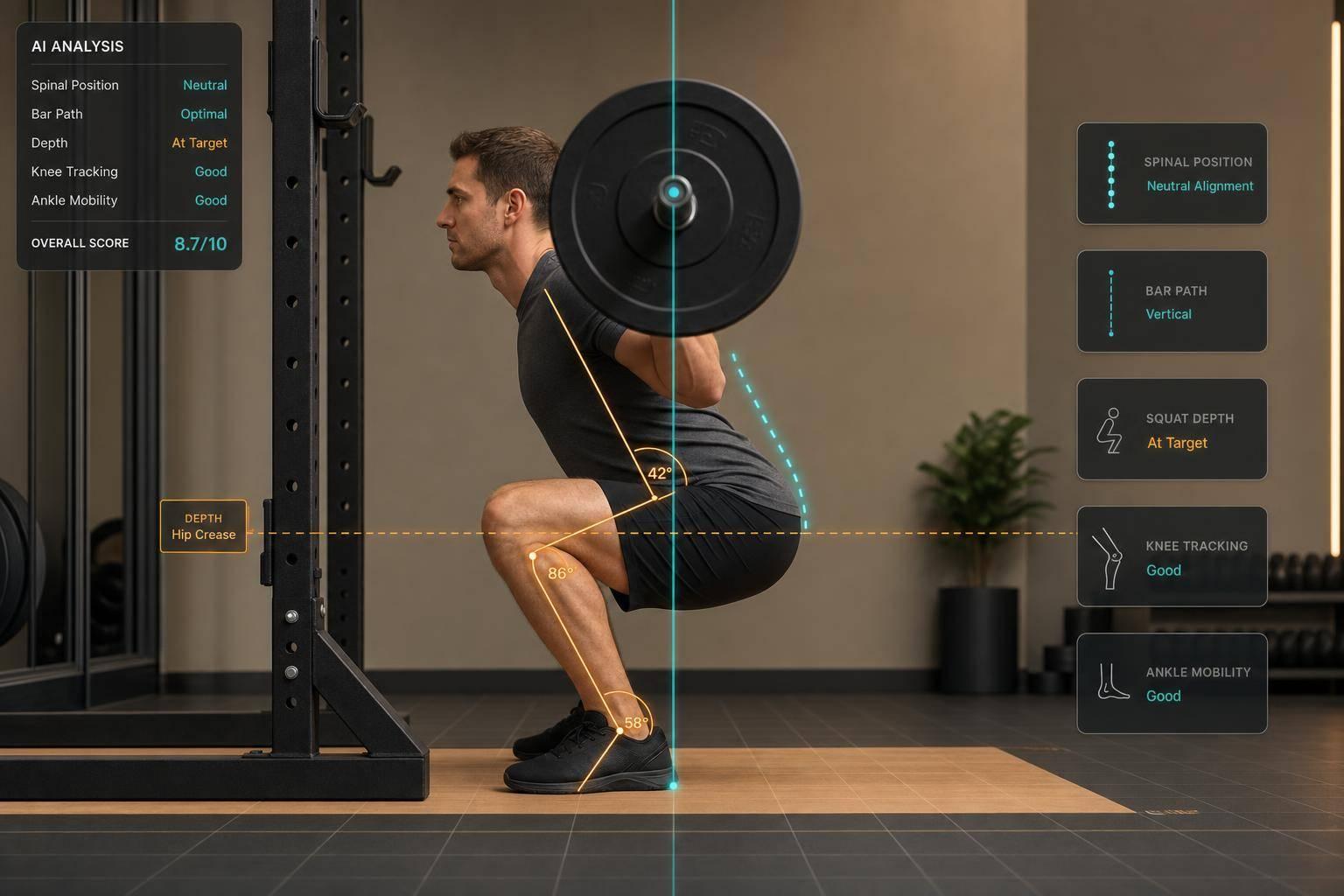
AI Tools for Analyzing Squat Spinal Positioning
If you want squat spine feedback from a phone video, CueForm AI is the clearest fit in this lineup. It checks lumbar rounding, forward lean, bar path, knee tracking, and depth, then turns that into cues you can use on the next set.
Here’s the short version:
- CueForm AI: auto-checks squat form and gives live audio cues
- Onform: manual coach review, no auto spinal fault checks
- Ochy: built for running, not squat spine review
- Kinotek: 3D movement analysis for pros, demo-based pricing
- Coach’s Eye: manual video markup, no auto detection
A few numbers stand out. CueForm reports about ±3.0° joint-angle error and around 75 ms latency on mobile. Its paid plan is $10/month or $89/year, while the other tools in this list mostly use manual review or do not show public U.S. pricing.
If I boil the article down to one point, it’s this: the tools split into two groups. One group tries to detect squat form mistakes from video. The other group helps a coach review video by hand.
Creating Your Own AI Fitness Trainer: Analyzing Squats with MediaPipe

Quick Comparison
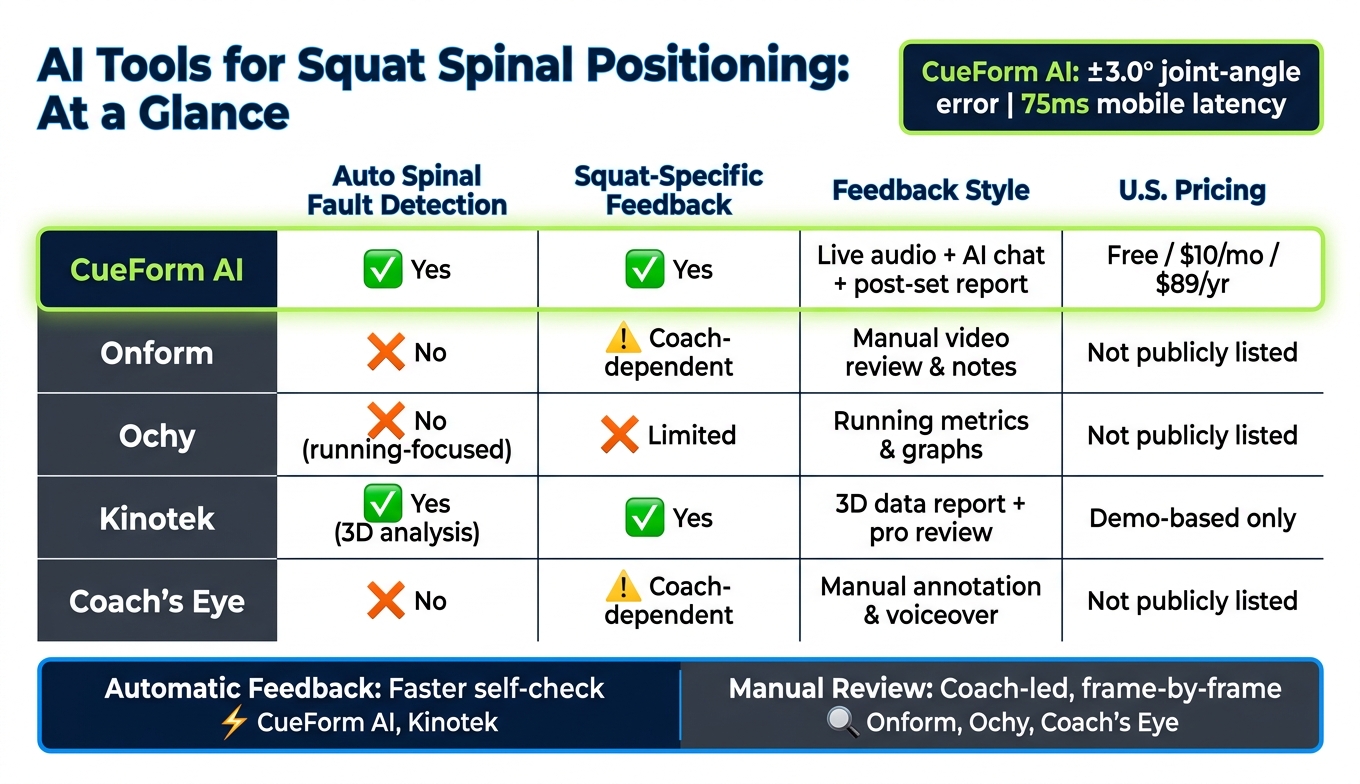
AI Squat Analysis Tools Compared: Auto vs. Manual Feedback
| Tool | Auto spinal fault detection | Squat-specific feedback | Feedback style | U.S. pricing |
|---|---|---|---|---|
| CueForm AI | Yes | Yes | Live audio, post-set report, AI chat | $0, $10/month, or $89/year |
| Onform | No | Coach-dependent | Manual video review and notes | Not publicly listed |
| Ochy | No, not for squats | Limited | Running metrics and graphs | Not publicly listed |
| Kinotek | Yes, via 3D analysis | Yes | Data report with pro review | Demo-based |
| Coach’s Eye | No | Coach-dependent | Manual annotation and voiceover | Not publicly listed |
What I like about this comparison is that it makes the tradeoff plain: automatic feedback is faster, while manual review depends more on the coach. So if you want a fast self-check between sets, CueForm AI is the main option here. If you want a coach to study your lift frame by frame, the manual tools may fit better.
1. CueForm AI
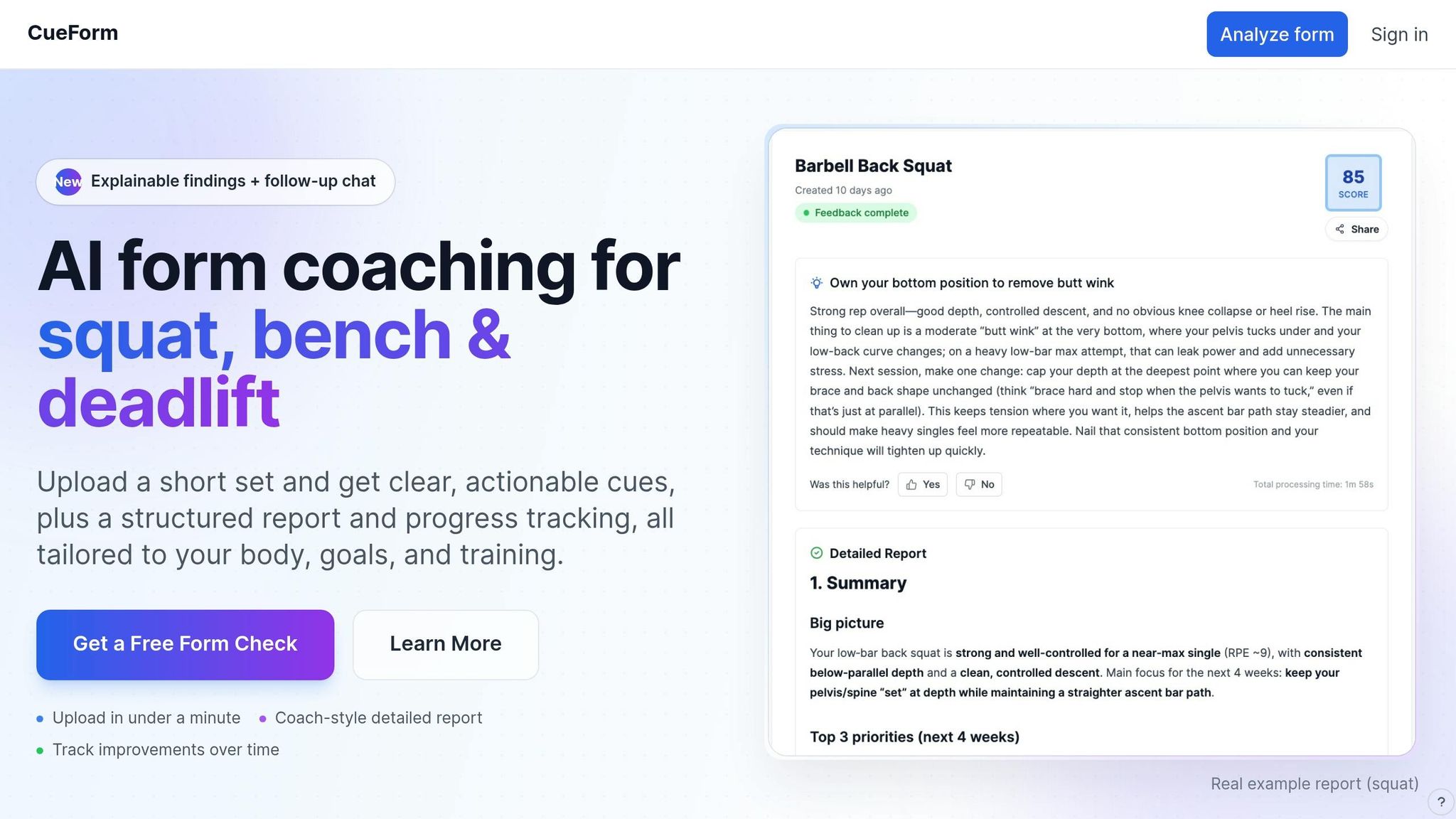
CueForm AI is built for strength training lifts like the squat, bench press, and deadlift. You upload or record a video, and it gives you squat cues based on what it sees. Here, the focus is on how CueForm AI spots spinal faults, explains them in plain English, and turns them into cues you can use the next time you train.
Spinal Alignment Detection
CueForm tracks shoulder, hip, and spine landmarks to spot spinal rounding during the lift. It flags lumbar flexion, often called "butt wink", at the bottom of the squat. It also flags too much forward lean by measuring torso angle against the floor and hips. To do that, it uses pose estimation to build a digital skeleton and calculate joint angles in real time[1].
On mobile devices, the average joint-angle error is about ±3.0°, with about 75 ms of latency[3]. In plain terms, that's fast enough to catch rounding or extra lean while you're still in the set, not long after the rep is over.
Feedback Quality and Corrective Cues
CueForm gives real-time audio feedback, which matters during a hard set when you can't stop and look at your phone. If your spine position starts to drift, it can call out cues to help you get back to a neutral spine.
After the set, you get a detailed report that splits feedback into two parts: what happened, and what to do about it[2][3]. That makes the feedback easier to act on. The "Explainable findings" feature shows the exact metric that triggered each cue, so you can see the link between the measurement and the fix instead of just getting a vague warning[2].
"We turn your video into cues you can use next session - grounded in bar path, positions, and the context you provide." - CueForm [2]
If a cue still doesn't land, the Coach AI chat gives you another layer of help. You can ask follow-up questions, ask for a different cue, or dig into mobility drills tied to the limit behind the issue[2].
Squat-Specific Usefulness
CueForm doesn't stop at spinal tracking. It also checks the squat mechanics that often shape spinal position in the first place. That includes squat depth, measured by hip crease relative to the knee, plus knee tracking, bar path over the midfoot, and tempo[1][2][4].
That matters because spinal faults don't always start in the spine. Sometimes the issue shows up because the bar drifts, the knees shift, or depth changes your position at the bottom. CueForm can also tailor feedback to your goals and anatomy when you add those details[2].
For better results, film from the side at hip height, use good lighting, and wear clothing that stands out from the background[3][4].
Pricing for U.S. Users
For U.S. users, Free costs $0/month and Starter costs $10/month or $89/year[1][2].
| Plan | Price | What's Included |
|---|---|---|
| Free | $0/month | Unlimited quick feedback, explainable findings, limited Coach AI chat, progress tracking, pay-per-report for detailed reports |
| Starter | $10/month or $89/year | Everything in Free, unlimited detailed reports, extended Coach AI chat quota |
2. Onform

This section moves away from auto-detection and into coach-led video review. Onform is a manual video review tool built for coach-to-athlete communication. Coaches review footage, mark up the video, and use it to give biomechanics feedback [5].
Spinal Alignment Detection
Onform does not auto-flag spinal positioning issues. Instead, a coach or user has to watch the squat video and manually check things like hip depth, spinal alignment, and knee tracking [5].
Feedback Quality and Corrective Cues
Because the review is manual, the feedback can feel much more personal and situation-specific [5]. A coach can add context, explain why something is off, and point out details that software might skip [5]. That makes Onform a better fit for detailed coaching than for instant, mid-set correction.
Squat-Specific Usefulness
For squats, Onform gives coaches a clean way to annotate spinal alignment and hip depth directly on the video [5]. That can make feedback easier to see and easier to act on.
Pricing for U.S. Users
For U.S. users, the main takeaway is simple: public U.S. pricing is not clearly listed in the available source material [5].
3. Ochy

Ochy uses smartphone video and computer vision to look at running mechanics, not squat spinal position. So if your main goal is checking back position during squats, it’s not much help.
Spinal Alignment Detection
Ochy’s pose estimation system tracks joint positions and calculates joint angles from a single video [6]. But it doesn’t include squat-focused spinal fault detection, like lumbar rounding or losing a neutral spine [6]. It can flag issues such as hip drop or inward knee collapse during movement [7], though that overlap with squat form is small. For squat analysis, there’s very little direct help for checking neutral spine.
Feedback Quality and Corrective Cues
Ochy shows joint-angle graphs and left-right asymmetries, but the feedback is built around running mechanics, not squat coaching cues [8].
Squat-Specific Usefulness
Its use for squat spinal positioning is limited because the product is made for running analysis [6].
Pricing for U.S. Users
U.S. pricing is not publicly listed.
4. Kinotek

Kinotek moves this comparison into the professional 3D assessment space. It’s a movement analysis platform built for fitness professionals and physical therapists.
Spinal Alignment Detection
Kinotek uses 3D Movement Analysis to calculate joint angles and flag squat alignment issues [9]. For spinal position in the squat, that gives coaches and clinicians a way to spot movement problems that can change how someone moves through the full pattern.
It also produces a visual report of movement data in seconds [9]. That’s useful on its own, but the main value comes when the data points to clear things to fix.
Feedback Quality and Corrective Cues
Kinotek’s 3D data helps support more targeted corrections [9]. So this isn’t just about taking measurements. It’s more helpful when squat position needs context and judgment.
Squat-Specific Usefulness
Kinotek centers on movement patterns like the squat, so it fits this use case well [9]. Its 3D view can help fitness professionals spot subtle left-to-right differences that affect spinal alignment during the lift [9].
That said, it works best with professional oversight. The reports still need someone to read them, connect them to what’s happening in the lift, and turn that into programming that makes sense [9].
Pricing for U.S. Users
Pricing is demo-based and isn’t listed in public [9]. U.S. users need to Book a Demo for pricing details [9]. That setup makes more sense for clinics and coaching businesses than for someone who just wants a quick self-check.
5. Coach's Eye
Coach's Eye is a manual coach-to-athlete review tool. It can help with squat review through manual annotation, but it does not detect spinal position on its own. So it fits coach-led review better than fast, on-the-spot form checks.
Spinal Alignment Detection
Coach's Eye does not analyze spinal alignment automatically [10].
Feedback Quality and Corrective Cues
Its drawing and voiceover tools make it easier to show what needs to change during a squat. But the quality of that feedback depends fully on the coach using it [10].
Squat-Specific Usefulness
For checking spinal position in the squat, Coach's Eye is most useful when an experienced coach is involved. The main use is marking what shows up on video, not auto-measuring spinal alignment [10].
Pricing for U.S. Users
Public U.S. pricing is not listed.
How These Tools Differ for Squat Spinal Positioning
CueForm AI is different in a pretty simple way: it spots squat spinal faults from a phone video and turns them into coaching cues. The main thing here is speed. CueForm takes squat footage and turns it into a spine-focused cue fast, which matters when you want something you can use before the next set.
Spinal Alignment Detection
CueForm AI flags squat spinal deviations from video by mapping a digital skeleton over the lifter's footage [1].
Feedback Quality and Corrective Cues
Spotting a fault is one thing. Turning that into advice you can use under the bar is another.
CueForm does that with an Explainable findings report that shows which metrics triggered each correction. It also includes an AI chat option, so you can refine the feedback in plain language instead of trying to decode a wall of numbers [2].
Squat-Specific Usefulness
CueForm isn't built for general movement analysis. Its model is tuned for barbell lifting, which makes it a better fit for lifters who want squat-specific feedback instead of broad form comments [2].
Pricing for U.S. Users
For U.S. users, the pricing is straightforward: a free tier and a $10/month Starter plan [2]. That makes it easier to weigh the tradeoffs in the pros and cons section.
Pros and Cons
Here’s the practical trade-off.
CueForm AI flags squat-spine faults like lumbar flexion and too much forward lean. Its biggest strengths are clear findings, follow-up AI chat, and corrective drills. On the downside, users have reported real-time lag and battery drain [3].
The bottom line is pretty simple: CueForm AI works best when you want fast, usable feedback. But it still makes the most sense when you pair it with your own judgment.
Conclusion
When the goal is squat spinal positioning, the best tool is the one that shows why your spine drifts and gives you a fix you can try on the very next set. CueForm AI stands out here. Its Coach AI chat helps lifters sharpen their cues and correct spinal position before the next session, with the focus staying on a neutral spine under load[2].
If you need broader manual review, coach-led tools can fit a larger video workflow. The tradeoff is that they tend to move slower when you want squat-specific spinal feedback. The better pick is the tool that explains what caused the drift and what to change next, not one that just points out the problem and leaves you there[2].
FAQs
How accurate is phone-based squat spine analysis?
Phone-based squat analysis can be very precise. It uses computer vision and pose estimation to track your movement frame by frame. Current systems can map 17 to 33 body landmarks and estimate joint angles within ±2.5 degrees.
That means the app isn't just watching a squat in a general way. It's measuring how your body moves through the full rep.
It can also spot higher-risk patterns like spinal flexion, torso lean, and hip shifts by comparing your movement against biomechanical standards. CueForm AI uses this analysis to give you personalized, actionable feedback on your squat spinal positioning.
What camera angle works best for squat feedback?
For the most effective squat analysis, record from a side profile (sagittal plane). This angle works best for checking spinal alignment and squat depth.
Set the camera at about waist or hip height, around 6 to 8 feet away, so your full body and range of motion stay in frame. Keep the setup stable and well lit to help CueForm AI give more accurate feedback.
Can AI cues replace a human coach for squat form?
AI tools can give objective, precise, data-driven feedback on squat mechanics. That includes form issues like knee valgus or spinal misalignment.
That said, they work best as a supplement, not a full replacement, for a human coach. A coach brings something software can't fully match: emotional context, lived judgment, and intuition.